
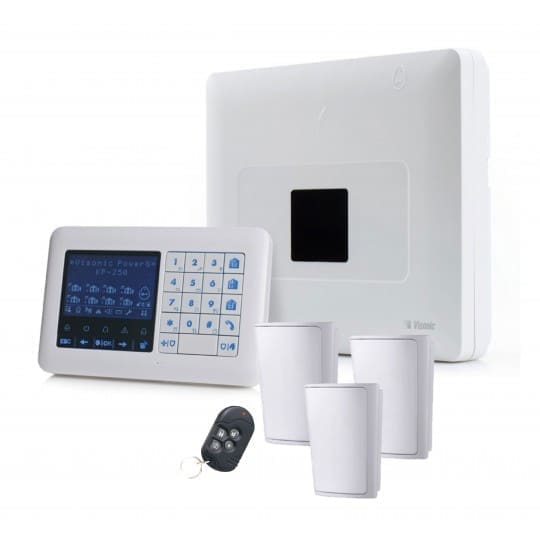
Visonic PowerMaster 33 Repairs, Support & Replacement
Support for existing PowerMaster 33 and PowerMaster 33 EXP G2 alarm systems across East Anglia.
Fault diagnosis, KP-250 keypad support, wired-expander reviews, batteries, communication upgrades and honest advice on whether repair or replacement is the better option.
Legacy-system support | Concealed control panel | PowerG devices | Wired-expansion assessment
Panel & Keypad Faults
Support for concealed panels, KP-250 keypads, enrolment, display and user-control problems.
Wired Expansion Review
Identifying ioXpander hardware, wired zones, outputs and the condition of retained cabling.
PowerG Device Support
Testing compatible wireless detectors, sirens, keyfobs and supported camera devices.
Repair or Replace
Clear advice where legacy communication, expanders or multiple faults affect long-term value.
An Established PowerMaster Platform, Not Our Default New Installation
The PowerMaster 33 G2 is a distributed PowerG alarm system. Its control panel is normally positioned out of everyday view and operated through a compatible wireless keypad such as the KP-250 PG2.
Johnson Controls still provides official PowerMaster 33 documentation, including a version 19.4 installation guide published in 2021. However, the PowerMaster 33 is not shown in Visonic’s current public PowerMaster panel range, which presently lists the PowerMaster 10, 30, 360 and 360R.
That does not prove that every PowerMaster 33 is formally discontinued or unsupported. It does mean that MW Global should treat it primarily as a legacy or established installed system requiring maintenance, repair, expansion assessment or replacement advice.
We do not promote the PowerMaster 33 as a standard modern new-installation choice. Any parts, modules or upgrades must be checked for current availability and exact compatibility.

PowerMaster 33 Services We Can Assess
Support depends on the exact PowerMaster 33 variant, software, expander hardware, administrator access and parts availability.
Control Panel Faults
Power, battery, tamper, communication, internal-module and unexplained system warnings.
KP-250 Keypad Problems
Display faults, lost enrolment, user operation, code management and keypad battery issues.
Wireless Device Faults
Offline PowerG detectors, weak signal, repeated alarms, low batteries and supported replacements.
Wired Zone & Output Faults
Reviewing expander modules, retained cabling, wired contacts, sirens and programmable outputs.
IP & Cellular Reviews
Identifying legacy PowerLink or cellular arrangements and assessing supported alternatives.
System Replacement Planning
Surveying PowerG devices and wired circuits before deciding what can be retained or must be replaced.
How the PowerMaster 33 System Is Arranged
Concealed Control Panel
The main control circuitry can be mounted in a suitable hidden or controlled location rather than used as the everyday keypad.
Wireless KP-250 Keypad
The official guide describes the panel operating with a KP-250 PG2 wireless display keypad for user and installer commands.
64-Zone System
The control panel provides a programmable 64-zone alarm platform. Used and available zones depend on the installed design.
Up to 48 User Codes
Official KP-250 documentation identifies 48 user codes for PowerMaster 30 and PowerMaster 33 systems.
A hidden panel can improve appearance and reduce casual access, but it must still be positioned for power, communications, wireless performance, maintenance access and tamper protection.
Wired Expansion: Variant and Module Matter
The old page described every PowerMaster 33 as supporting up to 56 wired zones. That is too broad without identifying the exact EXP or E variant and installed expansion hardware.
- Without an expander, the official guide describes one wired zone and one low-voltage siren connection
- The ioXpander-2×1 configuration provides two additional wired zones together with supported wired functions
- The ioXpander-8 provides eight programmable wired inputs or outputs
- Official ioXpander-12×4 documentation states that a PowerMaster-33 E G2 can use up to four modules providing up to 48 additional wired zones
- ioXpander-12×4 modules connect through an ioXpander-8 using RS-485
- Not every PowerMaster 33 is the E or EXP variant required for the larger expansion arrangement
We therefore inspect the panel label, expander modules, wiring and programming before quoting repairs, additions or reuse of existing circuits.
Should You Repair or Replace a PowerMaster 33?
The value of retaining the system depends on the condition of the panel, keypad, expansion modules, wireless devices, wired circuits and communication path.
Repair May Be Sensible When
- The control panel and KP-250 keypad remain stable
- The problem is isolated to a battery, detector, siren or one wired circuit
- Existing PowerG devices and retained cabling remain serviceable
- The current keypad-led operation still meets user needs
- A compatible replacement module is available
- Repair cost is proportionate to the likely remaining life
Replacement May Be Better When
- The panel or keypad has recurring faults
- Several expansion modules, wired circuits or wireless devices are failing
- Legacy communication hardware no longer supports the required service
- Replacement modules are unavailable or disproportionately expensive
- The customer wants a modern touchscreen, app or automation platform
- Repair and upgrade costs approach the value of a replacement system
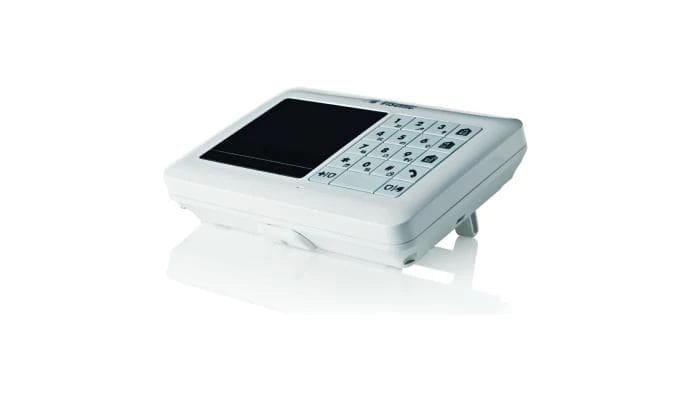
KP-250 Keypad, User Codes & Partitions
The PowerMaster 33 relies heavily on its compatible wireless display keypad. A keypad problem can therefore affect both everyday operation and installer configuration.
- Check keypad enrolment and communication
- Review keypad battery condition
- Investigate display, sound and button faults
- Review up to 48 authorised user codes
- Remove codes belonging to former staff or occupants
- Check keyfobs and proximity tags still held by authorised users
- Review up to three partitions where configured
- Document master-user and installer access
Some functions depend on software and configuration. For example, official documentation notes limitations around proximity-tag use when partitioning is enabled on certain versions.
PowerG Devices and Compatibility Checks
The official PowerMaster 33 guide lists broad peripheral capacities, but the exact model, age and supported firmware must be checked before replacements are ordered.
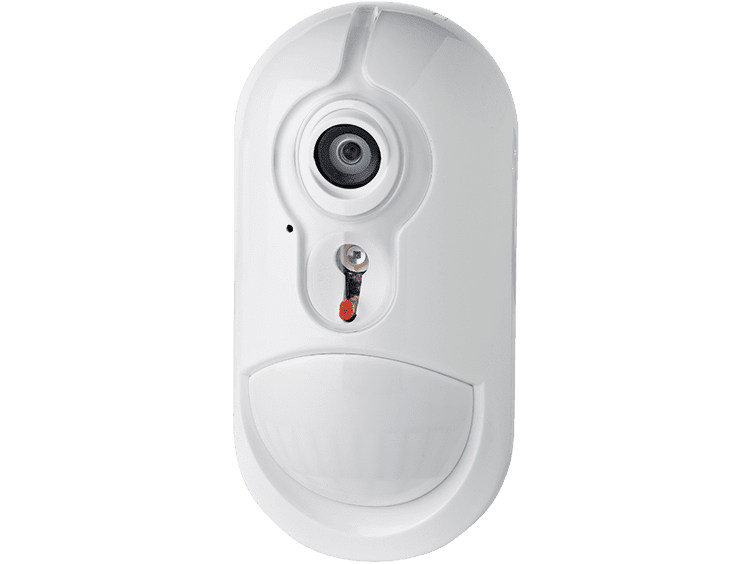
Intrusion & Camera Devices
Motion detectors, contacts, shock devices and compatible camera detectors can be tested or replaced where supported.
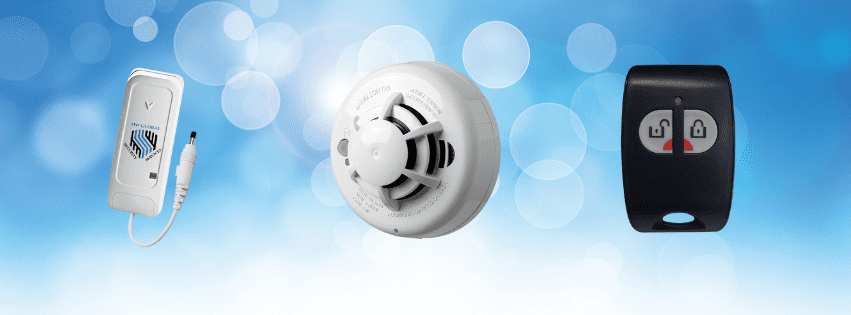
Safety & Panic Devices
Supported smoke, heat, carbon-monoxide, flood and panic devices may provide alarm-platform alerts but do not replace any required statutory system.
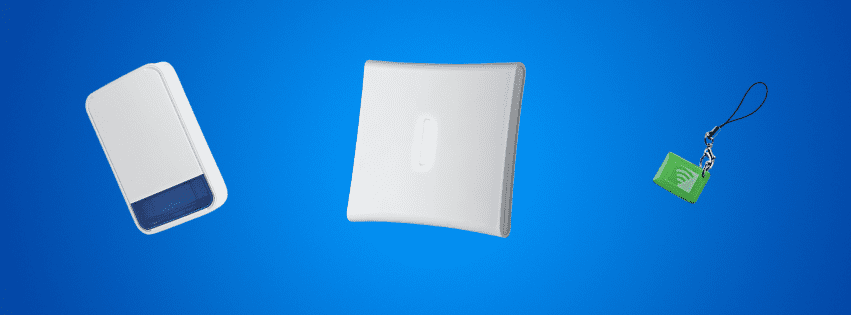
Sirens & Repeaters
The official guide identifies support for wireless sirens and repeaters, subject to the exact installed configuration.
Official Peripheral Reference
The version 19.4 guide lists capacities including 64 detectors, 32 keyfobs, 32 keypads—with up to 10 KP-250 keypads—eight sirens, four repeaters and 32 proximity tags.
These are maximum reference figures, not a recommendation to fill every category or proof that current replacement stock is available.
Communication, App & Monitoring Reality Check
The official 2021 PowerMaster 33 guide describes Ethernet IP together with older 2G or 3G cellular communications. That reflects the technology of the documented system and should not be presented as a modern default arrangement.
PowerLink 3 IP
The official guide describes PowerLink 3 for IP communication. It also states that the module is not supported by the panel battery, so it will not operate during a mains failure unless the wider network and equipment have suitable backup.
Legacy Cellular Modules
Older PowerMaster 33 systems may contain 2G or 3G cellular hardware. Network availability and service support must be checked rather than assumed.
LTE 868 Assessment
Visonic’s current LTE 868 information states compatibility with 868 MHz PowerMaster panels running software version 18.x or higher. Exact PowerMaster 33 compatibility still requires panel, software and service checks.
App Access
Remote control depends on communicator hardware, software, a PowerManage service and account configuration. It is not guaranteed by the panel name.
Visual Verification
The official guide supports alarm images from compatible Next CAM devices when the required IP or cellular path and monitoring setup are present.
Monitoring
Professional monitoring depends on supported reporting protocols, communicator, provider and response plan. Police attendance is not automatic.
Maintenance, Batteries & Annual System Checks
The official installation guide contains dedicated maintenance sections for backup-battery replacement, detector replacement or relocation and annual system checks.
- Panel backup-battery condition
- KP-250 keypad battery and communication
- PowerG device battery warnings
- Wired-zone and expander operation
- Siren and tamper tests
- Wireless diagnostics and link quality
- Partition and user-code review
- IP and cellular reporting checks where included
- Review of system records and previous alterations
After a detector is replaced or moved, the official guidance calls for a full diagnostic test. Maintenance should therefore verify the result rather than merely silence a fault message.

Grade 2, Insurance & Existing-System Status
Official PowerMaster 33 documentation states that the equipment can be used in installed systems up to security Grade 2. That is not the same as saying every existing installation remains Grade 2 compliant or accepted by an insurer.
Complete Installation
The panel, expanders, detectors, tamper protection, warning devices, power and signalling must be considered together.
Current Condition
Failed devices, undocumented alterations, unavailable communications and missing maintenance can affect continued suitability.
Written Requirements
Where insurance acceptance matters, obtain the insurer’s current written grade, signalling, installer and maintenance requirements.
Repair or maintenance does not automatically recertify an unknown or altered installation. Any records supplied will describe the work actually completed.
Replacement and Migration Options
A PowerMaster 33 replacement may involve both wireless PowerG devices and existing wired circuits. Neither should be assumed reusable until inspected.
Qolsys IQ Panel
Selected Qolsys variants can support compatible PowerG devices and may suit customers seeking a modern touchscreen and Alarm.com services. A dedicated installation page will be added.
Ajax Alarm Systems
Ajax provides a modern wireless platform with app control, visual verification and customer-owned configurations, but existing PowerG devices are not reused directly.
Hybrid or Wired Replacement
Where the property relies heavily on wired zones, a suitable current hybrid platform may offer better reuse and long-term support than a wireless-only replacement.
A migration survey should identify each wired circuit, PowerG device, siren, communicator, keypad and power supply before a replacement quotation is finalised.
Our PowerMaster 33 Support Process
1. Identify the Variant
Panel label, software, KP-250 keypad, EXP or E variant and expansion modules are recorded.
2. Map the System
Wireless devices, wired zones, outputs, sirens, users, partitions and communications are documented.
3. Test Key Functions
Power, batteries, tamper, devices, expanders, sirens and communication paths are checked as appropriate.
4. Compare Options
Repair, maintenance, communicator work and replacement are priced and explained separately.
5. Handover
The resulting condition, retained limitations and future support requirements are explained.
PowerMaster 33 Repairs & Support: Frequently Asked Questions
Is the Visonic PowerMaster 33 discontinued?
The PowerMaster 33 is not shown in Visonic’s current public panel range, although Johnson Controls still hosts official product manuals. We therefore describe it as a legacy or established installed system rather than making an unsupported claim that every version is formally discontinued.
Can you repair an existing PowerMaster 33?
Often, yes. We first identify the panel variant, software, KP-250 keypad, expansion modules, devices, communications and fault. Repair depends on condition and compatible parts availability.
Does every PowerMaster 33 support 56 wired zones?
No. Larger wired expansion applies only to specific E or EXP configurations with the correct ioXpander hardware. The exact total and available wired capacity must be confirmed from the installed modules and programming.
What is the ioXpander-8?
It is an internal PowerMaster 33 expansion module providing eight programmable wired inputs or outputs and a wired speech-box interface according to the official version 19.4 guide.
Can the system use ioXpander-12×4 modules?
Official documentation states that a PowerMaster-33 E G2 can use up to four ioXpander-12×4 modules through an ioXpander-8. This is variant-specific and must not be assumed for a standard panel.
How many user codes does the PowerMaster 33 support?
Official KP-250 documentation identifies up to 48 user codes for PowerMaster 33 systems, with user permissions assignable to configured partitions.
Can you replace or re-enrol a KP-250 keypad?
Potentially. The first KP-250 has a specific enrolment process and replacement may affect existing configuration. Panel version, keypad compatibility and access must be confirmed first.
Can the PowerMaster 33 be upgraded to LTE?
Possibly. Visonic states that its LTE 868 communicator supports compatible 868 MHz PowerMaster panels running software version 18.x or higher. Exact PowerMaster 33 support and service-provider compatibility must still be checked.
Will PowerLink 3 keep working in a power cut?
The official PowerMaster 33 guide states that PowerLink 3 is not supported by the panel battery. Continued IP reporting would therefore require suitable backup for the IP module, router and internet equipment.
Is the PowerMaster 33 automatically Grade 2?
No. Official documentation says the equipment can be used in installed systems up to Grade 2. The completed installation, current condition, signalling, maintenance and records determine its actual status.
Can existing PowerG devices move to Qolsys?
Some Qolsys panel variants support compatible PowerG devices, but reuse depends on frequency, exact device model, condition and panel compatibility. It must be surveyed before savings are promised.
Should I repair or replace my PowerMaster 33?
A repair can be sensible when the fault is isolated and the wider system remains healthy. Replacement is more likely to offer value where the panel, keypad, expanders, communications or multiple devices require work together.
Do you support systems installed by another company?
We can assess many third-party-installed systems where the customer has authority to manage the alarm and suitable administrator or installer access can be established.
Related Visonic Support & Alarm Services
PowerMaster 33 Support Across East Anglia
MW Global Security Services assesses suitable Visonic PowerMaster systems across Suffolk, Norfolk, Cambridgeshire, Peterborough and surrounding areas. Attendance and repair availability depend on location, access, system condition and parts support.
Need Help With an Existing PowerMaster 33?
Tell us the displayed fault, panel or EXP variant if known, KP-250 keypad condition, wired-expander arrangement and whether remote reporting still works. Photos of the panel, keypad and expander labels can help us prepare.
Customer Feedback
“Malcolm of MW Global came today and I was very pleased that he was able to fix a problem with our alarm. He was very efficient and knowledgeable about the system we had and so I would be very happy to ask for his help again.”
Kate Dove — Google review