

Ajax Alarm Monitoring Across East Anglia
Choose self-monitoring through the Ajax app or 24/7 professional monitoring support from MW Global Security Services, with an agreed call plan and optional security response.
Customer-owned systems | Direct local support | Event review | Optional keyholding and response
Self-Monitoring Available
Keep control through the Ajax app without adding MW Global professional monitoring.
24/7 Professional Monitoring
Agreed alarm events can be received and reviewed by the MW Global monitoring service.
Response Plan
Named contacts and authorised actions are agreed before professional monitoring begins.
Local Security Support
Optional keyholding, alarm response and patrol services can be added where available.
Find the Monitoring Information You Need
Use these links to move directly to the part of the page most relevant to your property or current Ajax system.
Monitoring That Matches the Property and the Risk
Ajax alarm monitoring should do more than send a general notification. The system, users and response plan must work together so that the right people receive useful information when an event occurs.
Some clients want full control through the Ajax app. Others need a professional service to review agreed alarm events, contact keyholders and arrange an authorised response. Both options can be built around a customer-owned Ajax system.
MW Global Security Services provides installation, maintenance, in-house monitoring support through Ajax PRO Desktop and optional local response. This is not presented as an accredited Alarm Receiving Centre (ARC), and police attendance is not automatic.

Ajax Alarm Monitoring Options
Start with the level of support that matches the site and change the arrangement later when requirements develop.
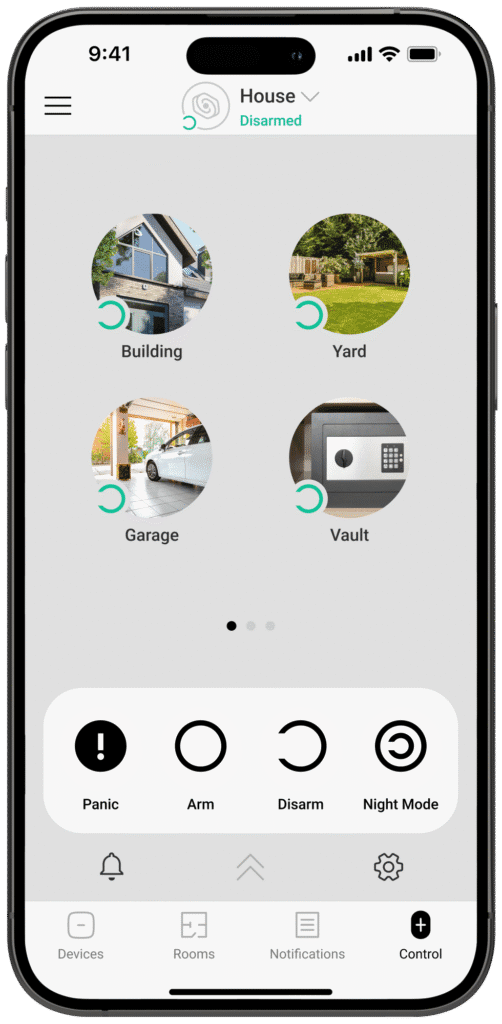
Self-Monitoring Through the Ajax App
Self-monitoring suits owners who can receive alerts, review the system and decide what to do. Approved users can see supported events, control the system and review device status through the Ajax app.
- Intrusion, tamper and fault notifications from configured devices.
- Remote arming and disarming for approved users.
- Event history and device status.
- Photo verification where a compatible device is fitted and configured.
- User permissions controlled by the system administrator.
- No MW Global professional monitoring service required.
Self-monitoring still needs a clear personal response plan. App alerts are only useful when an authorised person is available, has a working device and knows how to react.

24/7 Professional Ajax Alarm Monitoring
Professional monitoring suits properties where app-only alerts are not enough. Agreed events are received through the MW Global monitoring setup and handled under the response instructions prepared for the site.
- Review of agreed intrusion, tamper and system events, with panic events treated as a priority under the agreed service plan.
- Use of available event details and supported images where configured.
- Contact with named keyholders under the agreed call order.
- Optional security attendance where this is included and available.
- Incident notes and follow-up information where applicable.
- Support from the same provider that can install and maintain the system.
Professional monitoring does not guarantee police attendance, prevent every loss or replace emergency services. MW Global’s service is an in-house Ajax monitoring and response-support service rather than an accredited ARC. The actions available depend on the event, evidence, contract and site response plan.
Professional Monitoring Without Losing Customer Control
Connecting an Ajax system to professional monitoring should not remove the owner’s visibility, administrator rights or control over who can access system information.
Customer-Owned Equipment
Monitoring can be added to an Ajax system owned by the customer. Equipment ownership and the monitoring service remain separate.
Administrator Rights
The system owner should retain an appropriate administrator account and understand any permissions granted to installers or security companies.
Privacy and Image Access
MotionCam images, cameras and other visual information are only available where compatible equipment is installed and the required permissions have been granted.
Separate Service Charges
Monitoring, SIM or data services, maintenance, keyholding and officer attendance are quoted as separate elements where applicable.
Authorised users can continue to use the Ajax app according to their assigned rights. The customer can review users and company access, and should notify us whenever staff, keyholders, premises use or response instructions change.
MW Global’s service uses Ajax PRO Desktop for in-house monitoring support. It is not described as an accredited Alarm Receiving Centre, and it does not automatically provide a police URN or guaranteed police response.
What Can Ajax Alarm Monitoring Cover?
Only installed, compatible and correctly configured devices can send events. The monitoring plan should state which events are acted on and which are recorded or passed to the client.
Intrusion Events
Configured opening, movement, glass-break and perimeter devices can report alarm events through the hub.
Photo Verification
Compatible MotionCam devices can provide images linked to an alarm event where the feature is installed and authorised.
Panic and Duress
Supported buttons, keypads or app functions can send urgent manual alarm events under the configured setup.
Fire and Environmental Alerts
Supported smoke, heat, carbon-monoxide and water-leak devices may send alerts where fitted and configured.
Tamper and Device Warnings
The system can report selected tamper, low-battery, offline and communication warnings.
Connection Status
The available communication paths depend on the hub model and may include cellular, Ethernet or Wi-Fi connections.
What Happens When an Ajax Alarm Activates?
The exact action depends on the event and the response plan. Intrusion, panic, fire, leak and fault signals should not all be handled in the same way.
1. Event Generated
A configured detector, panic device or system warning creates an event.
2. Hub Communicates
The hub sends the available event through its active communication path.
3. Event Reviewed
The monitoring service checks the event type and any available supporting information.
4. Call Plan Followed
Named contacts are called in the agreed order when the plan requires it.
5. Response Considered
A security officer or other authorised contact may be requested where included and appropriate.
6. Event Recorded
The handling and known outcome can be noted for later review.
Monitoring With Keyholding and Alarm Response
Professional monitoring can be linked to a separate keyholding and alarm response service. This gives the monitoring team an authorised option when the site needs physical attendance and staff should not attend alone.
The response officer follows the site instructions, assesses the outside of the premises and enters only where authorised and reasonably safe. The officer may inspect agreed areas, contact the client, request further help and re-secure the site as far as possible.
Attendance is subject to the agreed service area, travel conditions, officer availability and contract. It is not an emergency-service guarantee and should not be presented as immediate response.

Who Uses Ajax Alarm Monitoring?
The strongest reason for professional monitoring is that a reliable person may not always be available to receive and manage an app alert.
Homes and Rural Property
Professional monitoring can support owners who travel, work away or cannot always respond to app alerts.
Shops and Offices
Out-of-hours alarms, panic events and system faults can be handled under an agreed business call plan.
Warehouses and Storage
Larger or unoccupied premises can combine monitoring with keyholding, patrols and maintenance.
Construction Sites
Wireless detection and cellular communication can support sites where layouts and broadband access change.
Vacant Property
Monitoring helps identify reported alarms and faults at buildings without permanent staff.
Landlords and Multiple Sites
Separate systems and response plans can support portfolios, subject to clear users and contacts for each property.

Temporary and Remote Ajax Monitoring
Ajax monitoring can support construction projects, vacant property, temporary facilities and remote locations where a conventional fixed alarm is not suitable.
The design must account for power, battery life, mobile signal, changing boundaries, detector positions and the people working around the system. A temporary alarm still needs a proper survey and response plan.
We can combine temporary Ajax equipment with professional monitoring, patrols or guarding. The arrangement can be reviewed when the site moves into a new phase or the protected area changes.
Setting Up Professional Ajax Monitoring
We can assess many existing Ajax systems, including systems installed by another provider. Ownership and administrator access must be confirmed first.
1. Review the Existing System
We confirm the hub, devices, communication paths, administrator access and known faults.
2. Agree Monitored Events
The plan identifies the alarm, panic, environmental and system events that require action.
3. Build the Call Plan
Named contacts, call order, opening hours and escalation instructions are recorded.
4. Add Optional Response
Keyholding, alarm response or patrol attendance is added where required and available.
5. Test the Connection
The system and agreed event handling are checked before the service is treated as active.
6. Review Changes
Contact details, users, devices, property use and response instructions should be kept current.
Ajax Alarm Monitoring Plans and Pricing
Pricing is quotation based because the system, monitored events, communication paths, call plan and response requirement differ between properties.
Self-Monitoring
The customer manages supported Ajax app alerts. There is no MW Global monitoring charge unless professional monitoring is added.
Broadband, mobile data, SIM, SMS or optional manufacturer services may still involve separate charges.
Professional Monitoring Support
A recurring monitoring charge covers the agreed event handling and call plan. The quotation identifies the system and events included.
Monitoring With Keyholding and Response
Monitoring, keyholding or standing charges and officer call-outs are separate elements. Attendance is subject to the agreed area and service terms.
SIM and Data Services
Cellular communication requires a compatible hub, active service and suitable signal. Renewal or data charges are identified separately.
Setup and Connection Testing
Existing systems may need inspection, administrator access, fault correction or configuration work before monitoring can begin.
Temporary and Multiple Sites
Temporary assignments and portfolios are quoted according to duration, number of systems, call plans and response arrangements.
Your quotation should show monitoring, SIM or data, maintenance, keyholding and call-out charges separately so the continuing cost is clear.
Monitoring Records, Limitations and Responsible Claims
Monitoring can support risk management and event review, but it should not be described as automatic insurance approval, legal compliance or guaranteed emergency-service attendance.
Event History
Ajax records system events that can help authorised users review alarms, faults, arming activity and device warnings.
Monitoring Notes
Where applicable, event handling and known outcomes can be recorded to support later client review.
Maintenance Records
Servicing can document battery, signal, communication and device checks. View Ajax maintenance →
Insurance Requirements
An insurer must confirm its own alarm, monitoring, installer and response requirements. Monitoring alone does not establish acceptance.
Fire and Environmental Limits
Supported smoke, heat, carbon-monoxide and leak devices can provide alerts but do not replace any required life-safety or building system.
ARC and Police Response
MW Global’s in-house monitoring support is not presented as an accredited ARC and does not automatically provide a police URN or guarantee attendance.
Why Choose MW Global Security Services?
- Registered Ajax installer with installation, servicing and monitoring experience.
- Direct MW Global monitoring through Ajax PRO Desktop rather than a generic third-party call centre.
- Customer-owned system options without forcing equipment rental.
- Self-monitoring or professional monitoring selected around the actual requirement.
- Optional local security response through keyholding, patrols and alarm attendance.
- Support for homes, businesses, vacant property and temporary sites across varied environments.
- Clear limitations and response instructions agreed before monitoring begins.

Related Ajax and Alarm Services
Use these pages for installation, maintenance and customer-ownership information. This page remains focused on monitoring.
Ajax Alarm Installation
New systems designed and installed for homes, businesses and temporary sites.
Ajax Alarm Maintenance
Health checks, battery replacement, repairs and system upgrades.
Alarm Systems Without Subscription Contracts
Learn how customer-owned alarms differ from bundled rental models.
Ajax Alarm Monitoring Coverage
Remote monitoring may be available beyond the physical response area. Keyholding and officer attendance depend on the site location and agreed service level.
Suffolk
Including Stowmarket, Ipswich, Bury St Edmunds, Newmarket, Woodbridge and suitable nearby areas.
Cambridgeshire & Peterborough
Including Cambridge, Ely, Huntingdon, Peterborough and selected surrounding locations.
Norfolk
Including Norwich, Great Yarmouth, King’s Lynn and suitable nearby locations.
Wider Regional Coverage
Selected monitoring and response arrangements are available in nearby parts of Essex, Bedfordshire, Lincolnshire, Leicestershire and Northamptonshire.
Ajax Alarm Monitoring Questions
What is Ajax alarm monitoring?
Ajax alarm monitoring is the process of receiving system events through the Ajax platform. The system may be self-monitored through the app or connected to a professional service that follows an agreed response plan. MW Global provides in-house monitoring support through Ajax PRO Desktop rather than an accredited ARC service.
Can I self-monitor an Ajax alarm?
Yes. Approved users can receive supported alerts and manage the system through the Ajax app. The owner remains responsible for seeing the alert and deciding what to do.
Can I move from self-monitoring to professional monitoring later?
Usually, yes. The system, communication paths, administrator access and event configuration must first be checked and a response plan agreed.
Does professional monitoring mean MW Global owns my alarm?
No. Professional monitoring can be added to a customer-owned Ajax system. The owner should retain suitable administrator access, while company and installer permissions are granted according to the support required.
Can you monitor an Ajax system installed by another company?
We can assess many existing Ajax systems. Monitoring can only begin after ownership, administrator access, configuration and system condition have been checked.
Does Ajax monitoring work without broadband?
Some Ajax hubs support cellular communication and some also support Ethernet or Wi-Fi. The available paths depend on the exact hub model, active services and signal conditions.
Can MotionCam images be reviewed?
Compatible MotionCam devices can provide images connected to an alarm event where the feature is installed, configured and authorised. Image availability is not the same as continuous video monitoring.
Can fire, carbon-monoxide and water-leak alerts be monitored?
Supported Ajax environmental devices may send alerts where they are installed and configured. These devices and the monitoring service do not replace any legally required fire alarm, life-safety or building system.
Does monitoring include a security officer response?
Not automatically. Keyholding and alarm response are separate services that must be agreed for the site. Attendance depends on location, conditions, availability and the contract.
Will the police attend an Ajax alarm?
Professional monitoring does not automatically create a police URN or guarantee police attendance. Emergency services should only be contacted according to the evidence, circumstances and agreed procedures.
What happens when an alarm event is received?
The monitoring service reviews the event and available information, then follows the site call plan. This may include contacting keyholders or requesting an authorised security response.
How much does Ajax alarm monitoring cost?
Cost depends on the system, communication method, monitored events, call plan, number of properties and whether keyholding or attendance is included. A clear quotation is provided after review.
Choose the Right Ajax Monitoring Setup
Tell us the property postcode, hub model, current monitoring arrangement and whether you need keyholding or officer attendance. We will review the system and explain the available options.